Is your child in Grade 1, around 5 -6 years old? If yes, you will be shocked by what Grade 1 students in our program can accomplish.
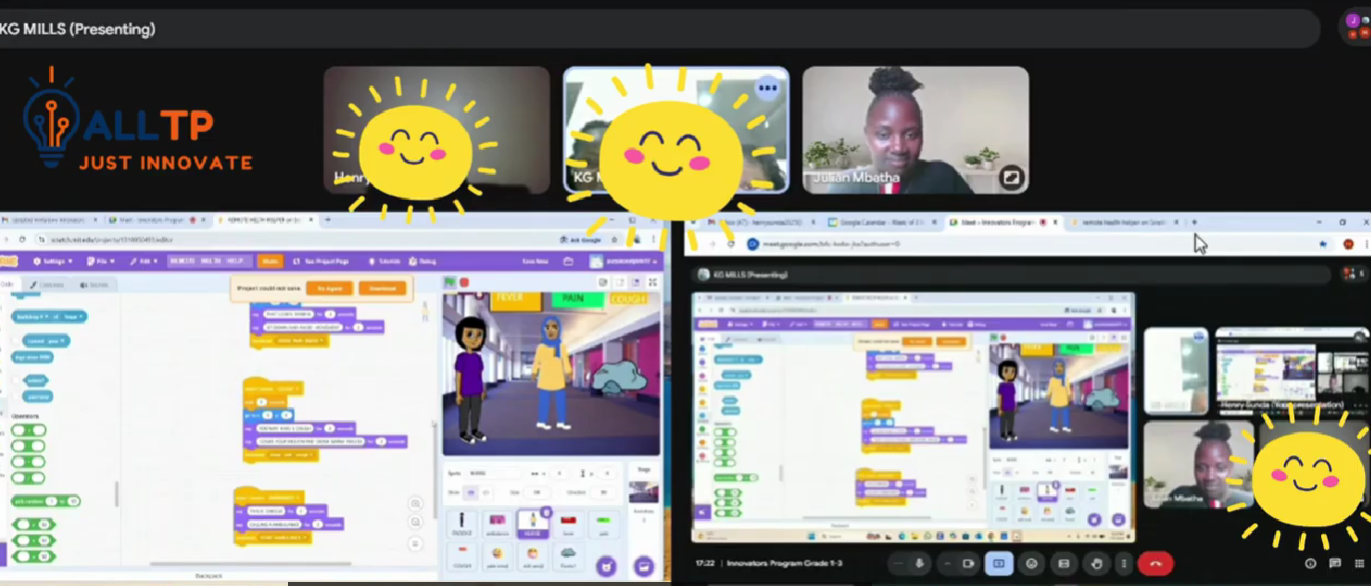
This Grade 1 student was able to create a remote healthcare app using Scratch. This is made possible because our Coding for Kids Grade 1 program is designed to spur critical thinking and enhance problem-solving skills.
Grade 1 students in our program are taught the following fundamentals:
- Fundamentals of Programming
- Problem-solving skills
- Debugging skills
- Resiliense
- Critical thinking
Remote Healthcare App
The Problem Statement
For this Grade 1 coding project, the innovators were required to find a solution that would be used in rural communities with no access to healthcare.
The problem statement was: How do we ensure rural communities get access to healthcare using technology?
Please keep in mind that kids in the program have been given the ability to choose the design and solution for their projects.
The Solution:
This young innovator created a remote healthcare app that would be used by rural communities to call for help in case of an emergency.
When thinking of rural communities, think of communities that have to walk 100 kilometers just to find a clinic. Think of communities where mothers die while giving birth because the doctor could not be called in time.
Or
Communities where a child dies because the mom or dad has no first aid knowledge that could stabilise the child as they take him/her to hospital. These are the challenges that this Grade 1 child is trying to solve using technology.
How Does this Remote Healthcare App Work?
This Grade 1 coding solution was built using Scratch. In the attached video, the child used several sprites, such as an ambulance, a doctor, a nurse, and a patient.
The young innovator also included variables such as fever and headaches to act as some of the most common symptoms that children in rural communities have.
Once you click the green flag to run the code/ program, the program will welcome the patient with
“Hello, how are you today? Please click a symptom to get started.” The symptoms are already prefilled in the Scratch program.
Once you click a symptom like fever, the system gives you several first AId options to follow.
For example:
Symptoms and First Aid Actions
Severe Bleeding:
- Symptoms: Heavy spurting or flowing blood.
- Action: Apply direct firm pressure with a clean cloth. Elevate the wound if possible.
Choking:
- Symptoms: Inability to breathe, speak, or cough; clutching the throat.
- Action: Give 5 back blows between the shoulder blades followed by 5 chest thrusts (or abdominal thrusts) until the airway clears.
Burns:
- Symptoms: Redness, pain, or blistering.
- Action: Cool the burn under cool running water for 10 to 20 minutes. Do not use ice, butter, or ointments on severe burns.
“If the symptoms are severe and the pain level is unbearable, the system will immediately call the nearest ambulance. This is to ensure that the ambulance arrives on time, as every second matters.” Lorna, Grade 1 Innovator in our coding program for kids.
Are you tired of your Grade 1 child watching annoying Facebook reels? If yes, enroll them in our school of innovators to spur their creativity and problem-solving skills.